Texas Instruments | Vernier | SAM Labs 臺灣獨家總代理 | 關於我們
Aug.23.2026
分類主題:教學支援適用範圍:TI-84 Evo

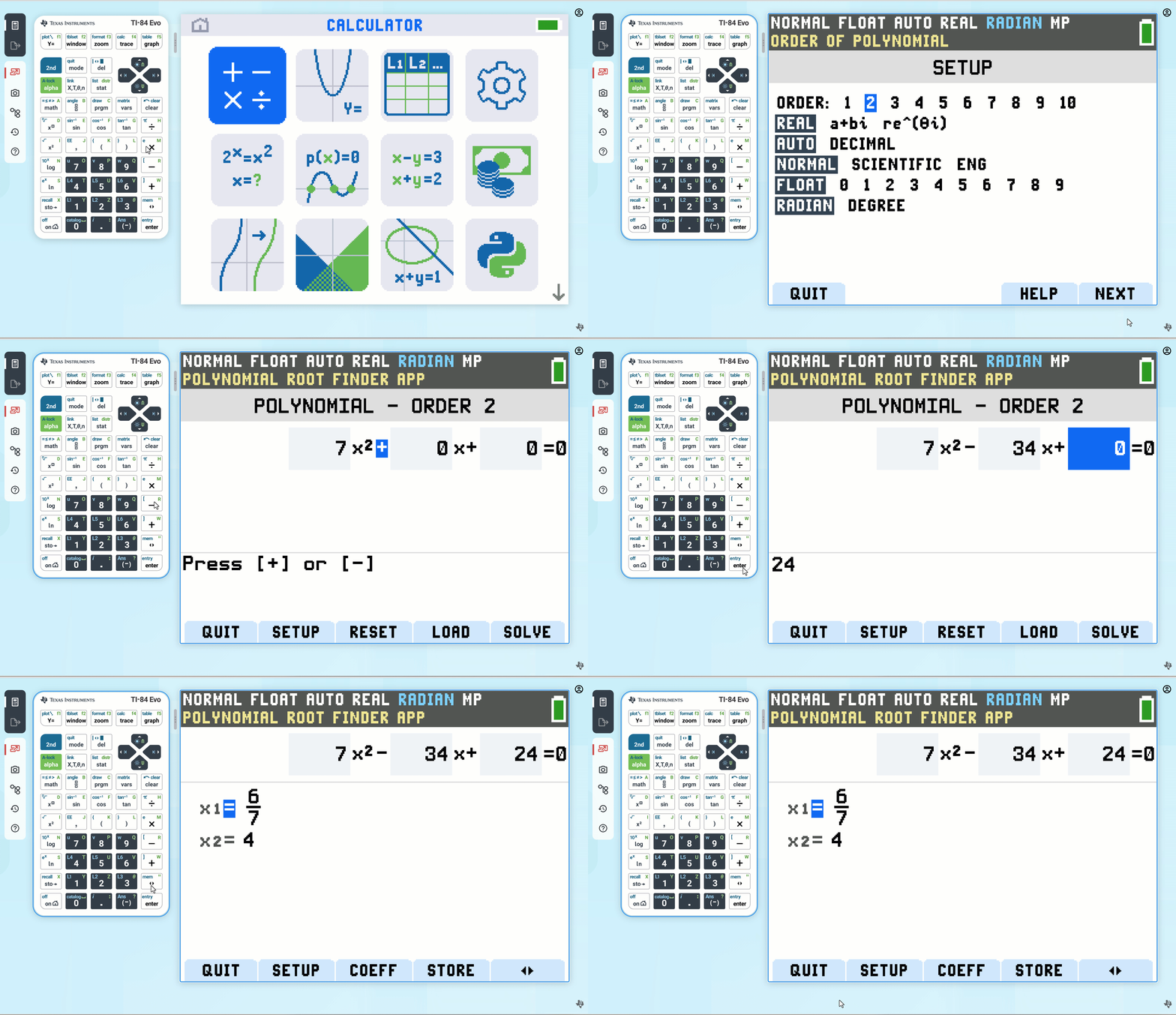
Polynomial Root Finder 應用程式可計算 1 至 10 次多項式的根(零點),並提供一個方便且易於使用的介面。您可以輸入要計算的多項式係數、將解答儲存至列表中、將列表載入 Polynomial Root Finder 應用程式中作為係數,並在退出 Polynomial Root Finder 應用程式後,將多項式儲存至 Y-Var 以進行繪圖。
如需 Polynomial Root Finder 應用程式的介紹,請參閱以下範例。
Polynomial Root Finder Setup
| Order (次數) | 設定範圍從 1 到 10。 |
| Real / a+bi / re^θi |
Real 模式不會顯示複數結果。如果您選取此模式設定且答案為複數,結果將會顯示為 NONREAL。 a+bi(直角複數)模式會以 a+bi 的形式顯示複數。您可能需要按下向右箭頭鍵 › 才能顯示完整的複數。 re^θi(極座標複數)模式會以 re^θi 的形式顯示複數。您可能需要按下向右箭頭鍵 › 才能顯示完整的複數。 |
| Auto / Dec | AUTO 會以類似輸入格式的形式顯示答案。DEC 會將答案顯示為整數或小數。 |
| Normal / Sci / Eng | 將表示法模式設定為 Normal、Scientific 或 Engineering。 |
| Float | Float(浮點數)小數模式最多可顯示 10 位數字,加上正負號與小數點。 |
| Radian / Degree | 解讀角度數值並以弧度(radians)或度數(degrees)顯示答案。 |
Example (範例): y=7x^2 - 34x +24
Note (備註): 若可行,按下切換鍵 <> 可在小數與分數之間進行變更。
透過將模式設定為複數然後進行求解,即可顯示多項式的複數根。
From Mode Setting (從模式設定)
a+bi(直角複數)模式會以 a+bi 的形式顯示複數。您可能需要按下向右箭頭鍵 › 才能顯示完整的複數。
re^qi(極座標複數)模式會以 reqi 的形式顯示複數。您可能需要按下向右箭頭鍵 › 才能顯示完整的複數。
Example (範例): y=x^3 -11/2 x^2 +10x + 13/2
Note (備註): 若可行,按下切換鍵 <> 可在小數與分數之間進行變更。
{ "widgetSpec": { "id": "polynomial-root-finder-simulator", "height": "600px", "prompt": "Objective: Create an interactive polynomial root finder calculator.nData State: initialValues: none.nStrategy: Form Layout.nLibraries: Math.js.nInputs:n- Polynomial Coefficients (Inputs for degrees 1 to 3)n- Find Roots ButtonnBehavior: Allow users to input the coefficients of a polynomial (up to degree 3 for simplicity). Upon clicking 'Find Roots', use a mathematical library to calculate and display the roots below the input fields. Highlight if the roots are real or complex." } }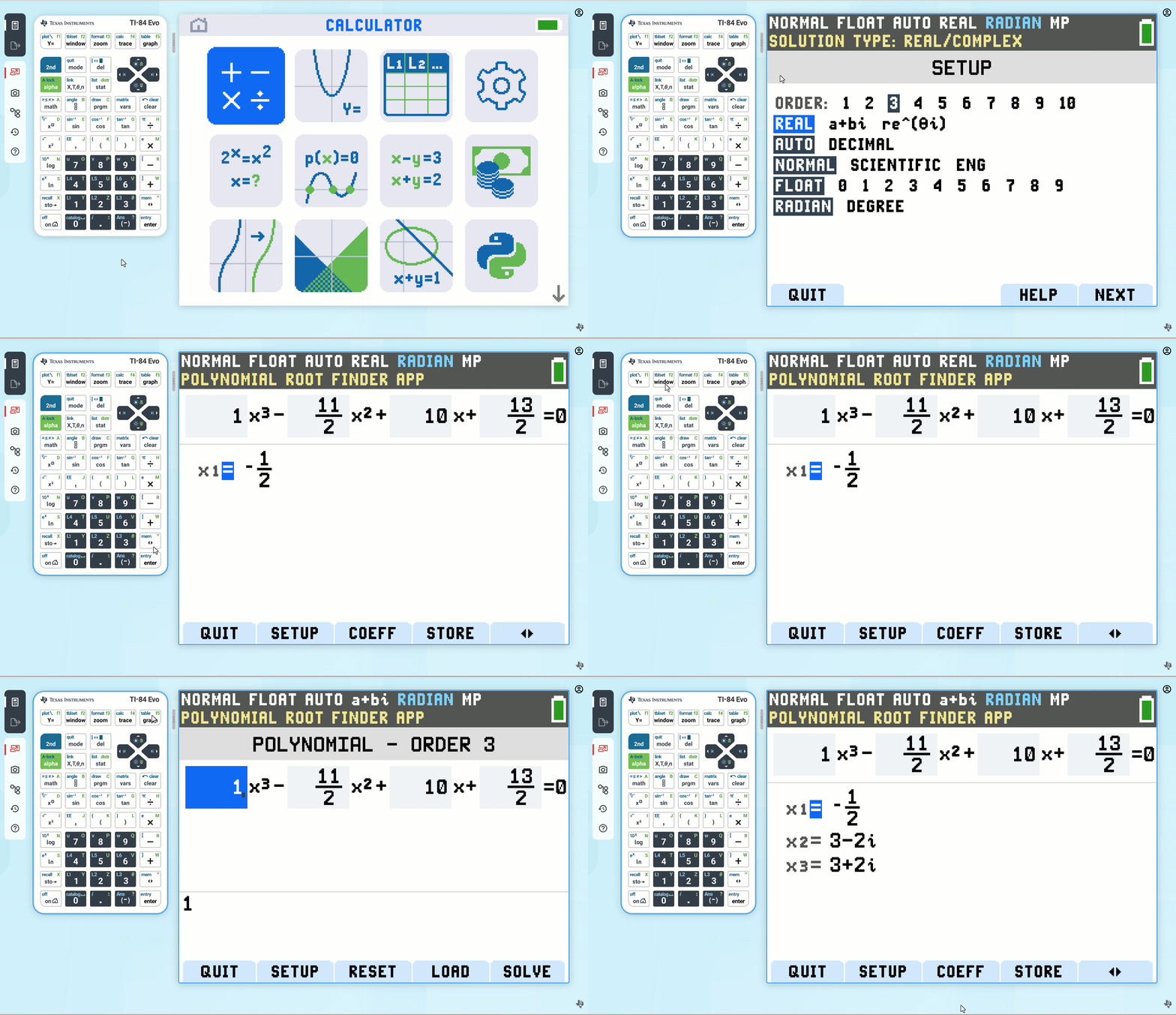


 |
 |